
 Join our Discord
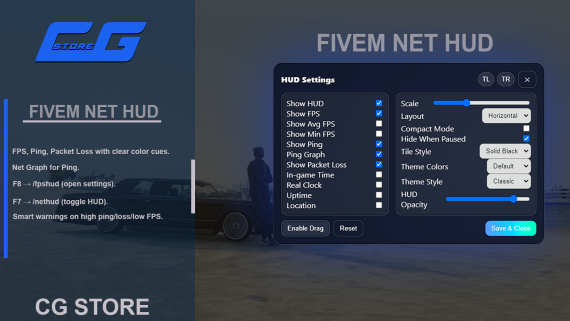
Net HUD – Stand-alone Performance Overlay for FiveM
ESX • QBCore • Any server
Preview: https://youtu.be/2S2y1daOfog
Discord: https://discord.gg/zzT5UrHZ8A
Key Features
Real-time metrics
FPS, Ping, Packet Loss | optional Avg / Min FPS, Uptime, Real-world Clock, In-game Time, LocationLive settings UI –
/fpshud(default F8) opens a panel that previews changes instantly; settings saved per player.Themes that truly reskin
5 colour palettes: Default · Midnight · Solar · Verdant · Crimson
6 style presets: Classic · Neo · Cyber · Terminal · Pill · Hex
Classic style keeps an extra 8 Tile Styles (Black, Gradient, Mesh …)
Drag, scale, snap – move anywhere, choose horizontal / vertical layout, or shrink with Compact Mode.
Quick toggle –
/nethud(default F7).Ping sparkline for at-a-glance connection stability.
Hide when paused (optional).
Ultra-lightweight – 1 s stat loop, minimal NUI traffic, zero server-side threads.
Commands & Keybinds
| Command / Key | Action |
|---|---|
/fpshud (F8) | Open settings panel |
/nethud (F7) | Toggle HUD visibility |
All keybinds can be changed in the FiveM settings.
Installation
Drag the
net_hudfolder into yourresources.Add
ensure cg_nethudtoserver.cfg.Restart the server or run
/refresh+ensure net_hud.
• No dependencies • Auto-detects ESX / QBCore or runs pure standalone.
Compatibility
Tested on OneSync Infinity & OneSync Legacy
Works with any framework (or none).
Per-player settings use client KVP (no database needed).